Showing posts with label Families. Show all posts

Thursday, May 11, 2017

What is FormIt and Why Do I Care?

There's no question we use a lot of tools in the design process. In addition to Reivit we use, Sketchup, Rhino, Navisworks, Enscape, C3D, and Dynamo, just to name a few. So this post is about yet another tool to go in your tool belt. But stay with me. I'm going to explain why you should be interested in using FormIt.

What is it?

FormIt is an Autodesk product that looks and feels a lot like Sketchup. Some of the modeling techniques are similar and it's really fluid like Sketchup. So you may be asking yourself... "If I have Sketchup, why do I need Formit?" Keep reading.

Conceptual Model with Revit

  • Conceptual mass families created in FormIt become Revit mass families
  • Lefel created in FormIt become levels in Revit
  • FormIt models with materials appplied

Conceptual Modeling with Revit Content in FormIt

  • Groups in FormIt can be categoriezed to become Revit families
  • Revit families can be exported as FormIt groups and then converted back into the original Revit family.

Why Do I Care?

Ask yourself one question. Do I car about becoming more efficient at what I do? If the answer is yes and you find yourself struggling with the Sketchup to Revit workflow, give FormIt a try. FormIt has a short learning curve that can be overcome in just a few days. 
Oh, I almost forgot. FormIt can be launced from the Chorme web browser and is also available on mobile devices. The FormIt team has always wanted you to be able to design anytime anywhere.
Of course FormIt isn't perfect. It's a fairly new product and is still maturing. However, if you want to explore the possibilities of becoming more efficient by using a tool more compatible with Revit, give FormIt a try. What do you have to lose?

Click here to learn more about designing in 3D anywhere and here to learn more about designing with intelligence. 


Monday, August 1, 2016

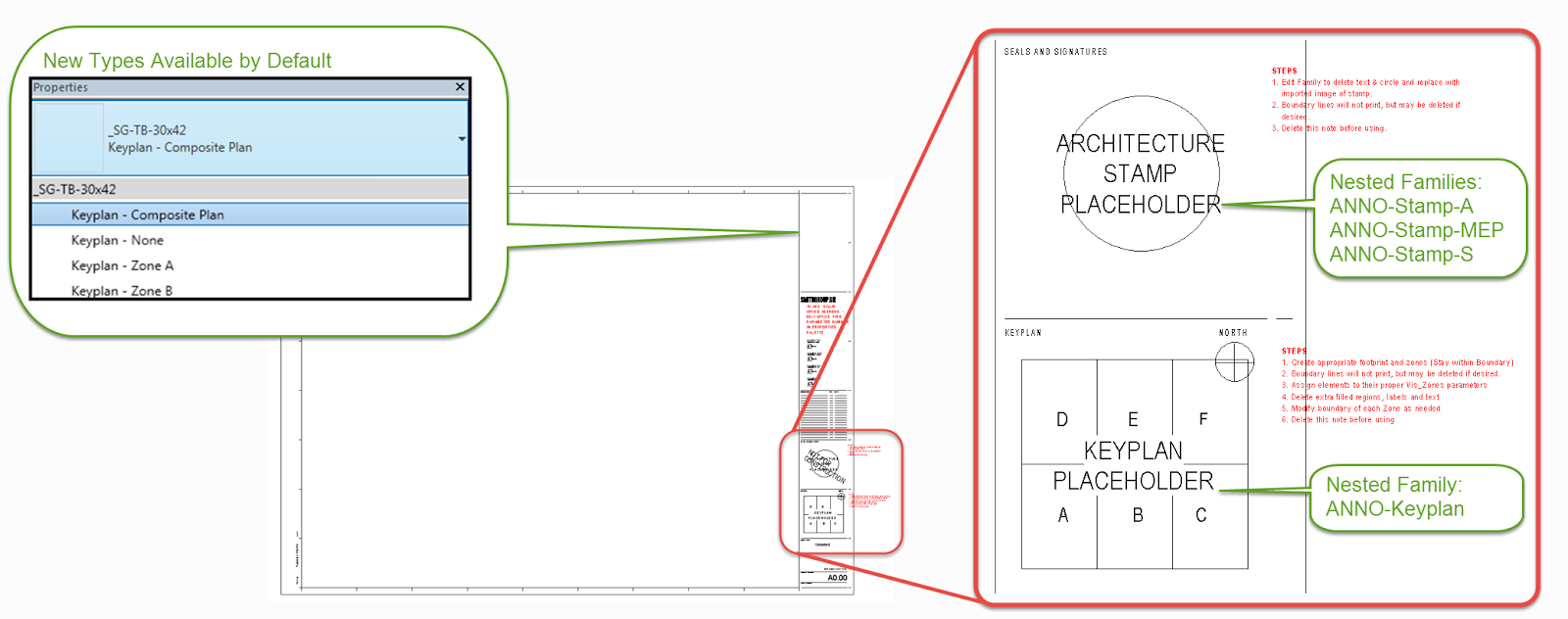
Nested Key Plan and Stamp families... Am I late to the party?

Why didn't I think of this sooner? 

Actually why didn't I think of this at all? We just implemented nested stamp and key plan families in our title block families. I wish I could say it was my idea, but as is usually the case one of our power users suggested it.

I love things that make our lives easier

All we did is create place holder annotation families  for a stamp and a key plan. Then we nested those place holder families into our standard title block. Now when people want to add a stamp or key plan all they have to do is edit the nested family, reload it back into the title block, then load the title block into their project. All the visibility parameters are already assigned so people don't have to worry about if they're that step. Because let's face it. People forget that step, and if you forget that step you get nothing when you flick the visibility switch.

It's the little things. Actually this one is huge!
 

Thursday, July 17, 2008

Reference Lines (reference planes long lost brother)

Yes it's true, reference planes have a long lost brother, they were separated a birth or something like that. Anyway like brothers, Reference Lines and Reference Planes have there differences. This post will cover Reference Lines and why you should be using them. Reference Lines in my opinion are mostly overlooked. I must admit I'm guilty of it myself. However, as this post will show, Reference Lines are quite useful for some very specific functions. You can only access Reference Lines in a family creating mode, that means only when creating a component family in the Family Editor or an in-place family in your project. Reference Lines define two perpendicular work planes, and you can manage the orientation of a reference line parametrically with the Angle parameter. You use the TAB key to select a work plane in which you want to work. Click here to view video tutorial.

Welcome to revitED!

RevitED (Revit Education) and general BIM topics. I've been using Revit now for 11 years, and though I feel I've got a pretty good handle on the software it seems each day I learn something new. I want to share that with the readers of this blog and hope you learn something new as well.